
![[AndyB] Calendar](/data/resource_icons/0/949.jpg?1734064598)
- XF Compatibility
- 2.2.x
- 2.3.x
- Short Description
- A fully integrated Calendar system based on thread information. Adds Calendar tab, easy to use format, customizable holidays. Compatible with various user groups. Installation: Download, unzip, install.
Description:
A fully integrated Calendar system based on thread information.
This add-on will create a fully integrated Calendar system based on thread information. Each calendar entry links back to the thread it was created from.
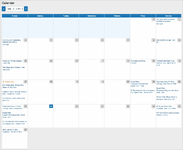
(Example of Calendar tab - pic 1)
Features:
Calendar View
This determines which user group will see the Calendar.
Calendar Add and Remove Own
This allows adding and removing calendar events for the thread starter. Typically set to Allow for the Registered user group.
Calendar Add and Remove All
This allows adding and removing calendar events for any thread. Typically set to Allow for Administrative and Moderating user groups.
Widget setup:
To add a Calendar events widget in the sidebar do the following:
Admin Control Panel -> Appearance -> Widgets
Add widget
Select Calendar events and Add widget
Enter the following:
Widget key = calendar_events
Title = Calendar events
Display in positions = Forum list: Sidebar
In the Options page of Calendar:
Show events maximum = 5 or whatever maximum you would like
Steps to add a new calendar entry:
Q: Is there an option to sync this calendar to other calendars?
A: No.
Q: How can I edit or add holidays?
A: See this link: How to change or add Calendar holidays?
A fully integrated Calendar system based on thread information.
This add-on will create a fully integrated Calendar system based on thread information. Each calendar entry links back to the thread it was created from.
(Example of Calendar tab - pic 1)
Features:
- Adds Calendar tab to navigation bar (pic 1).
- Easy to use calendar format (pic 2).
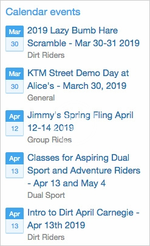
- Option for calendar widget block (pic 3).
- Calendar menu link in more options (pic 4).
- Calendar menu options (pic 5).
- Thread view shows which calendar dates have been added (pic 6).
- Thread list shows which threads have calendar entries (pic 7).
- Calendar add allows adding event dates (pic 8).
- Calendar add recurring allows adding recurring event dates (pic 9).
- Calendar remove will remove calendar entries for that thread (pic 10).
- Full customization of holiday options.
- Thread view permissions honored.
- All phrases start with calendar_ for your convenience.
- Download Andy-Calendar-4.1.zip and unzip it.
- Copy the src/addons/Andy/Calendar directory to your server.
- From the Admin Control Panel Install the add-on.
Calendar View
This determines which user group will see the Calendar.
Calendar Add and Remove Own
This allows adding and removing calendar events for the thread starter. Typically set to Allow for the Registered user group.
Calendar Add and Remove All
This allows adding and removing calendar events for any thread. Typically set to Allow for Administrative and Moderating user groups.
Widget setup:
To add a Calendar events widget in the sidebar do the following:
Admin Control Panel -> Appearance -> Widgets
Add widget
Select Calendar events and Add widget
Enter the following:
Widget key = calendar_events
Title = Calendar events
Display in positions = Forum list: Sidebar
In the Options page of Calendar:
Show events maximum = 5 or whatever maximum you would like
Steps to add a new calendar entry:
- Create a new thread or navigate to existing thread.
- Click Thread Tools.
- Click Calendar add.
- Select calendar event date and optional end date.
- Submit calendar event.
- Creates a new table called xf_andy_calendar
- Adds a column to xf_thread called andy_calendar
Q: Is there an option to sync this calendar to other calendars?
A: No.
Q: How can I edit or add holidays?
A: See this link: How to change or add Calendar holidays?


![[AndyB] Birthday calendar](/data/resource_icons/19/19799.jpg?1720149334)
![[AndyB] Advertising responsive](/data/resource_icons/7/7380.jpg?1720149273)
![[AndyB] Cube](/data/resource_icons/11/11639.jpg?1720149296)